Product teams love feature lists.
Features are concrete. You can estimate them, assign them, build them, and put them on a slide. They give everyone the satisfying feeling that the product is moving forward.
Unfortunately, a team can deliver every feature on the list and still build the wrong product.
The problem usually starts before the first line of code. The team begins by asking, “What should this product do?” when the better first question is, “What should the customer be able to accomplish, and what should that experience be like?”
Those questions sound similar. They’re not.
I laid out this model in a talk for the WP London Meetup in March 2025, and am looping back to expand on the parts that matter most when putting it into practice.
Define Success First
Before deciding how to build a successful product, you have to decide what success means for this product.
Sometimes the answer is paying customers and profit. Sometimes the product fills a gap in a larger offering, improves retention, solves a costly support problem, or makes another product more useful. Success may mean adoption, ease of use, happier customers, or some combination of those things.
Those products won’t all be built or prioritized the same way.
This matters in hosting because the industry has shifted. Customers increasingly expect a complete solution, not simply space on a server and a list of tools they have to assemble themselves. A host may build a product to generate direct revenue, but it may also build one to help customers succeed, reduce churn, or make the rest of its services more valuable.
Name the intended outcome before debating the features. Otherwise the team may deliver exactly what it planned without knowing whether any of it worked.
Features Aren’t the Product
Imagine you’re building an onboarding flow for a security product.
The feature list might include account creation, domain verification, a scan, an alert, and a dashboard. That’s enough information to describe functionality. It isn’t enough to describe a useful experience.
What does the customer understand when the first alert arrives? Do they know how serious it is? Do they know what to do next? Can they tell whether the problem has been resolved? How much expertise does the product expect them to have?
If you don’t answer those questions, the product will answer them for you, usually through whatever was easiest to implement.
That’s how teams end up with technically complete products that confuse the people they’re supposed to help.
Work From the Outside In
I use a simple sequence when planning a product:
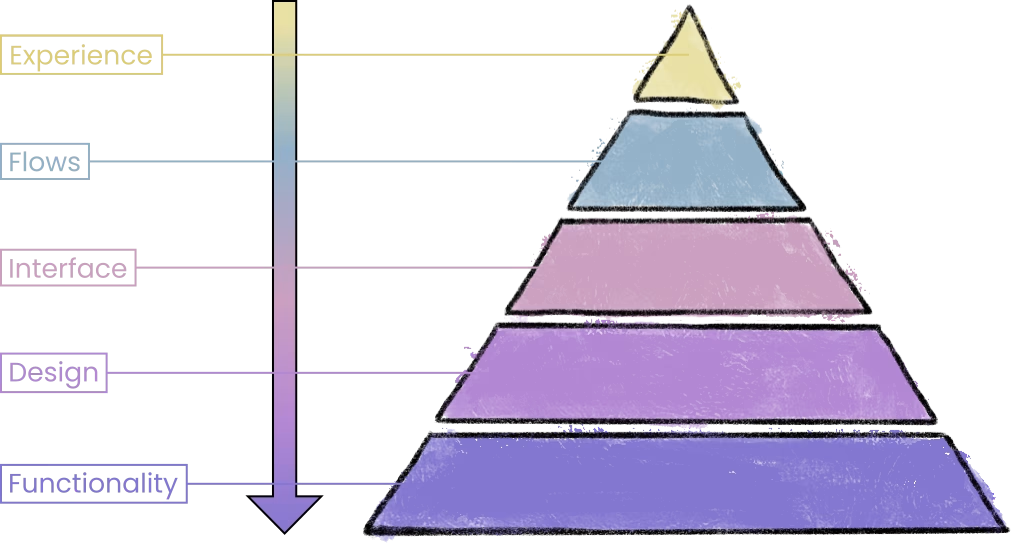
Engineering may build the pyramid from the bottom up, but product planning needs to move from the experience down.
This isn’t a waterfall process. These layers inform one another, and teams will move back and forth between them. The order is about where the product gets its direction.
A pyramid is normally built from the bottom up. Products often are too. The code, databases, infrastructure, and functionality support everything above them.
Customers experience the other end of the pyramid.
They care about whether the product helps them accomplish something, whether they understand it, and whether using it feels worth the effort or money. The top may be the smallest part of the picture, but it’s the part that gives everything underneath it a purpose.
You may build from the bottom up. You have to plan from the top down.
Experience
Start with the outcome and the customer’s state of mind.
What are they trying to accomplish? What do they know when they begin? What should they understand and be able to do when they’re finished? Where are they likely to be uncertain, frustrated, or afraid of making a mistake?
This is broader than whether the product is pleasant to use. A security customer may need to feel confident that taking action won’t break their site. A hosting provider may need to understand how a product affects support volume before enabling it for thousands of customers.
The intended experience includes the practical and emotional conditions required for the product to be useful.
Flows
Once the experience is clear, map the steps that make it possible.
What starts the process? What decisions does the customer have to make? What information do they need at each point? What happens when something fails?
Flows expose assumptions early. A product that sounds simple in a feature list may require the customer to jump between systems, wait for another person, or understand terminology they’ve never seen before.
It’s much cheaper to discover that while mapping a flow than after building the interface.
Interface
The interface is the set of controls, messages, and information the customer needs to move through those flows.
This is where you decide what belongs on a screen, what needs emphasis, and what can wait. The interface should reflect the customer’s decisions, not the internal structure of the software.
Customers shouldn’t have to understand your architecture to use your product. They have their own work to do.
Design
Visual design gives the interface hierarchy, consistency, and clarity.
It matters. A lot. But visual polish can’t rescue a confused flow, and a beautiful screen can’t answer a question the product never considered.
Design works best when it has a clear job to do.
It also works best when it respects what customers already know. If nearly every table puts search and filtering at the top, that’s where people will look for them. Moving those controls somewhere more creative doesn’t make the product more innovative. It makes a familiar task harder.
There are good places to differentiate. Common interaction patterns usually aren’t one of them.
Functionality
Now the team has enough context to make better decisions about what to build.
Functionality is still critical. The difference is that it now serves an intended experience instead of defining one by accident.
Engineering should be involved throughout this process. Engineers understand the systems, constraints, and opportunities that shape what’s possible. Early technical input can prevent a team from designing an elegant fantasy.
That doesn’t mean implementation should lead the product. Feasibility should inform the experience, not silently replace it.
Build the Team Around the Questions
Different stages require different kinds of depth.
Early on, product, research, design, and engineering need to agree on the problem, the people affected, and the constraints. As the experience and flows become clearer, interaction and visual design can go deeper. As the team moves toward delivery, engineering and quality work naturally expand.
That doesn’t mean each discipline waits outside the room until its turn. Handoffs create their own problems. It means the team’s focus and staffing should match the questions that need answering.
On one product team, our user researcher also served as the UX designer. I owned quality control. Two people divided the UI work between visual design and implementation, a dedicated project manager kept the work coordinated, and a development team built the product with help from other engineers as needed.
That wasn’t the only team structure that could have worked. It fit the product and the people we had. More importantly, the responsibilities were visible. We knew who was learning from customers, who was protecting the intended experience, who was coordinating the work, and who was making it real.
Clarity should drive growth.
Research Has to Become Direction
User research isn’t simply talking to customers.
The harder work is taking what customers say, separating the recurring needs from individual preferences, and turning that information into something a team can use. Good research doesn’t hand engineering a stack of interview notes. It helps the team understand the problem well enough to make decisions.
Research should continue after the first plan. Prototypes, moderated testing, unmoderated testing, and small beta groups can show whether the product works the way the team thinks it does.
Beta groups need care. Participation fades, people get busy, and the group may need to be refreshed. That’s still cheaper than discovering after a broad launch that customers can’t find the thing you thought was obvious.
UX and UI Aren’t the Same Job
UX and UI are often treated as interchangeable labels. I don’t find that very useful.
UX is primarily an advocate for the person using the product. It focuses on research, scenarios, information architecture, flows, wireframes, prototypes, and whether the experience makes sense.
UI turns that structure into the visual and interactive system people will actually use: layout, controls, typography, color, branding, and implementation details.
There is overlap, and one skilled person may handle both. The distinction still matters because a polished interface doesn’t prove that the underlying experience is sound.
Give Quality a Clear Owner
Before the team starts building, decide who has the final say on whether the product is good enough.
Larger teams create plenty of opportunities for individual pieces to be acceptable while the whole product feels inconsistent. Someone needs the authority to say the edges are still too rough, the experience doesn’t match the intent, or the product is ready to ship.
This shouldn’t be arbitrary control or personal taste dressed up as quality. It should be accountability to the experience the team agreed to create.
Project management matters here too. Even a small team benefits when someone owns coordination, documentation, and the reasons behind decisions. That work lets specialists focus on their jobs and gives the team something to return to when the next iteration begins.
Stakeholders and marketing also need to be involved without replacing the customer as the center of the product. Product leadership includes keeping those groups informed, earning the necessary support, and translating their needs into the same set of decisions.
Plan for Change Without Moving Everything
Most products don’t end at launch.
They gain customers, new use cases, new requirements, and ideas nobody had during the first planning session. A team that plans only for version one can paint itself into a technical corner, but architecture isn’t the only concern.
Customers learn where things are.
Moving a familiar control or reorganizing a workflow can frustrate people even when the new design is theoretically better. The team may see an improvement. The customer experiences the loss of something they already understood.
You can’t predict every future feature, and trying to do so will create its own kind of overengineering. You can leave conceptual space for the product to grow. Think about where likely capabilities could fit, which parts of the experience need to remain stable, and how new work can be introduced without forcing customers to relearn the whole product.
Plan for the future without building all of it today.
Must-Haves Before Wow
Every product has a list of features that would be impressive in a demo.
Some of those ideas may become real differentiators. The danger is building them before the product has earned the right to be interesting.
Customers need the basics to work first. They need to understand the product, complete the central task, recover from mistakes, and trust the result.
The “wow” can build loyalty. The must-haves earn trust.
This doesn’t mean innovation always waits. Sometimes the differentiating idea is the simplest route to the customer’s outcome. But when a feature competes with the core experience, the core experience wins.
The balance continues after launch.
Marketing naturally wants visible features it can show in an advertisement, capture in a screenshot, and give customers a reason to talk about the next release. Those features matter.
The product also needs work that won’t earn an exciting announcement: performance improvements, confusing flows that need cleanup, maintenance, and expected capabilities that every credible competitor already has.
In a hosting control panel, activating and deactivating plugins isn’t a headline feature. It’s still something customers expect to be able to do.
On one team, we labeled roadmap work as “wow” or “must-have” and deliberately interspersed the two. The labels weren’t a scoring system. They made the tradeoff visible so the roadmap could keep the product dependable while still giving customers something new to be excited about.
A roadmap made entirely of must-haves becomes stagnant. One made entirely of wow features becomes unreliable.
A Better Starting Conversation
Before creating the feature list, get the team together and answer six questions:
- What does success mean for this product?
- Who is the customer in this situation?
- What are they trying to accomplish?
- What do they know, fear, and expect when they begin?
- What needs to be true for them to trust the outcome?
- How will we know the experience worked?
Then map the flow. Identify the decisions. Bring in the technical constraints. Decide what interface the customer actually needs. Only then turn the answer into functionality.
You’ll still end up with a feature list.
It’ll simply describe a product worth building.